Battery sizing is where most home backup budgets go wrong. People get quoted for a system twice as big as they need because nobody asked the simple question first: what are you actually trying to keep running, and for how long? Answer that, and the right size, and price, falls out naturally.
This guide walks through that math in plain terms so you buy the backup you need and not the one that pads someone's commission.
Who this guide is for
- You are considering a home battery, a large portable station, or a solar-plus-storage setup.
- You want to right-size it rather than trust a sales quote.
- You are comfortable doing a little back-of-envelope math (I will keep it easy).
Step 1: Decide what you are backing up
This is the fork that changes everything. Be honest about which one you actually want:
- Essentials only: fridge, internet, phones, a few lights, maybe a CPAP machine. This is what most people really need, and it fits a large portable station or a small home battery.
- Essentials plus comfort: add a microwave, some outlets, a small window AC. Mid-size battery territory.
- Whole-home: central AC, well pump, electric range, everything. This needs a large fixed battery, real money, and usually solar to back it.
If you are torn between a portable unit and a fixed battery, I compared them in home battery vs portable power station.
Step 2: Add up your daily backup energy (kWh)
You size a battery in kilowatt-hours (kWh), which is just watt-hours divided by 1000. For each thing you want to run, estimate its energy per day: its average watts times the hours it runs, then add them up.
Rough daily figures to start from:
| Load | Rough energy per day in backup |
|---|---|
| Fridge (cycling) | 1 to 2 kWh |
| Internet router and modem | 0.2 to 0.5 kWh |
| Phone and laptop charging | 0.2 to 0.5 kWh |
| Lights (LED, a few rooms) | 0.3 to 0.6 kWh |
| CPAP machine (no humidifier heat) | 0.3 to 0.5 kWh |
| Microwave (occasional) | 0.2 to 0.4 kWh |
| Window AC (small, part-time) | 2 to 5 kWh |
| Well pump (intermittent) | 1 to 3 kWh |
Essentials only (fridge, internet, phones, lights) usually lands around 2 to 4 kWh per day. Add comfort items and you climb quickly. Add AC or a well pump and you can double or triple it.
Step 3: Multiply by days of autonomy
Decide how long you want to ride out an outage on battery alone:
Battery size needed (kWh) = daily backup energy x days of autonomy / usable depth
- Most outages are short, so one day of autonomy is a sensible baseline.
- "Usable depth" matters: you rarely get 100% of rated capacity. Plan for about 80 to 90% usable depending on the system.
- If you have solar to recharge each day, you can size for less battery, because the sun refills it. Without solar, a long outage simply drains whatever you bought.
So essentials at ~3 kWh/day for one day, at ~85% usable, is roughly a 3.5 kWh battery. Two days without solar, roughly 7 kWh. That is a very different quote from the 13 kWh unit someone might try to sell you "to be safe."
Want to sanity-check runtime for a specific battery size and load set? Run it through the blackout runtime calculator.
Common mistakes I see
- Sizing for whole-home when you only need essentials. The single most expensive mistake. Most people are fine backing up four or five things.
- Forgetting usable depth. Rated capacity is not all deliverable. Build in headroom.
- Ignoring surge on motors. A well pump or AC compressor spikes hard at startup. The battery's power output (kW), not just its capacity (kWh), has to handle that.
- Buying battery instead of solar. Without solar, a long outage still ends when the battery is empty. If outages in your area last days, pairing with solar often beats simply buying more battery.
My honest take
For most homes, "essentials for one day" is the honest target, and it is a lot smaller and cheaper than the default quote. Start there. Size up only if you have named the extra loads and accept the cost. And if outages in your region routinely last multiple days, put money into solar recharging before you put it into an oversized battery.
Once you have a target kWh, compare formats in the home battery vs portable station comparison, and if you are eyeing a large plug-in unit, see the EcoFlow Delta Pro Ultra review.
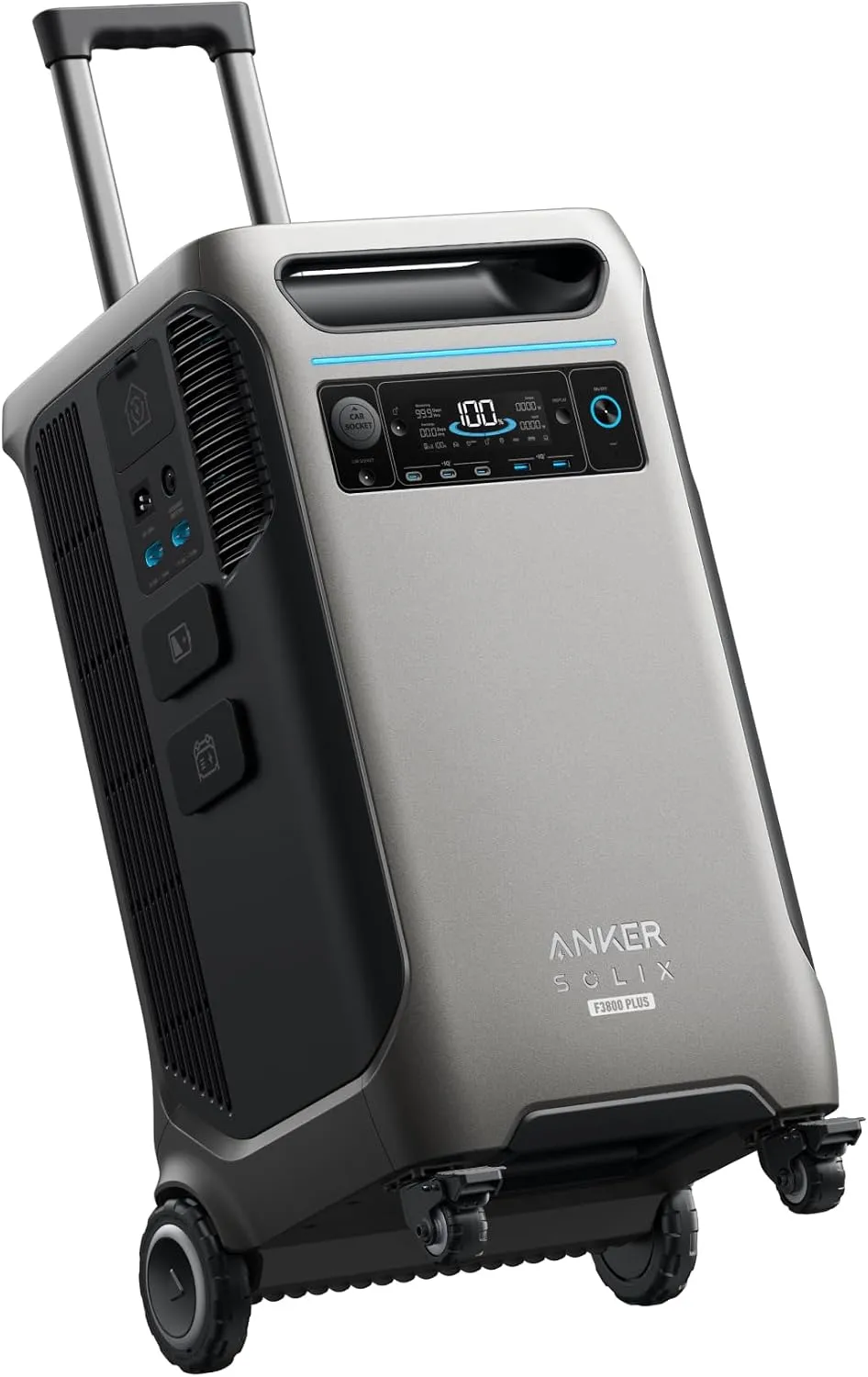
Anker SOLIX F3800 Plus
The strong points:
- 3,840 Wh and 6,000W of 120V/240V output: enough for a well pump, a dryer or a window AC, not just the fridge
- Expandable to 53 kWh, so you start with one unit and grow into multi-day outage coverage
- 3,200W of solar input, high enough to actually refill a battery this size in one good day
- LiFePO4 cells with a 5-year warranty and Anker's InfiniPower long-life design
The weak points:
- Well over 100 lb: this is a fixed installation, not something you carry to a campsite
- Real whole-home switching needs the Home Power Panel or a transfer switch, which is a separate purchase and an electrician
- Heavily oversized (and overpriced) if you only want to keep a fridge and some lights alive
Where to buy it for the best price
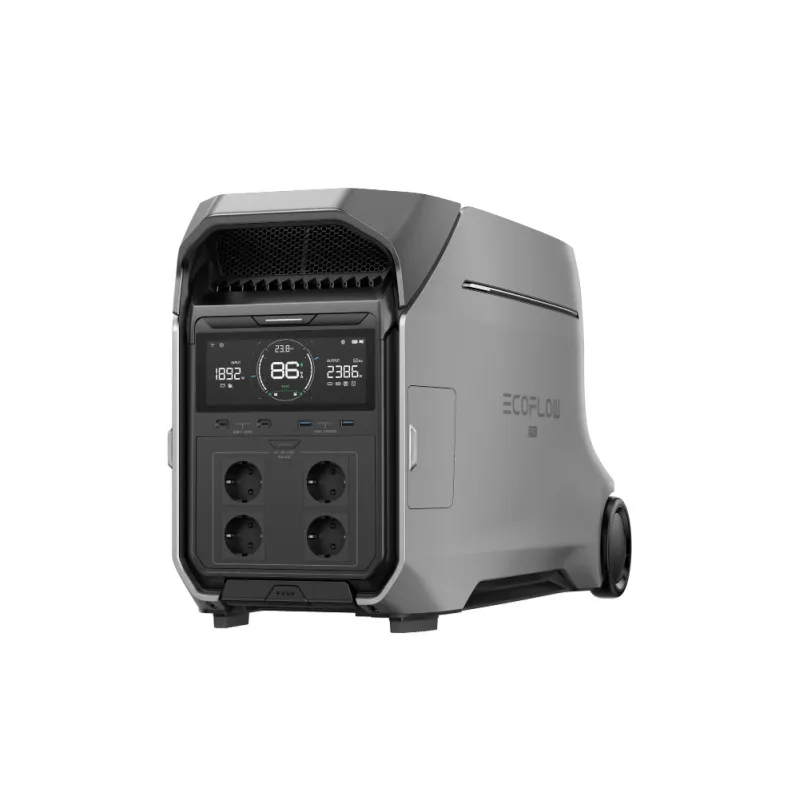
EcoFlow DELTA Pro 3
The strong points:
- 4,096 Wh and 4,000W at 120/240V: the sweet spot between a portable station and a fixed home battery
- Expandable to 48 kWh, so the same unit covers a long outage if you keep adding batteries
- Wheels and a telescopic handle, so unlike most batteries this size one person can still move it
- LFP cells with a 5-year warranty and near-instant UPS switchover
The weak points:
- Around 110 lb: portable in the airport-luggage sense only
- The 240V and whole-home features only pay off with the matching panel or transfer switch
- Expensive per watt-hour compared with adding expansion batteries to a smaller unit
Where to buy it for the best price
Sizing is only half the decision. The other half is how the power reaches your circuits, which is what actually separates the four levels of backup — that's on the home backup hub. More step-by-step guidance is in my home backup buying guides, verdicts on specific systems in my home backup reviews, and the scoring method in how I rate products.